ZeroDrift™
DockingMatrix™ — 9 Combinations. Zero Analog Interference.
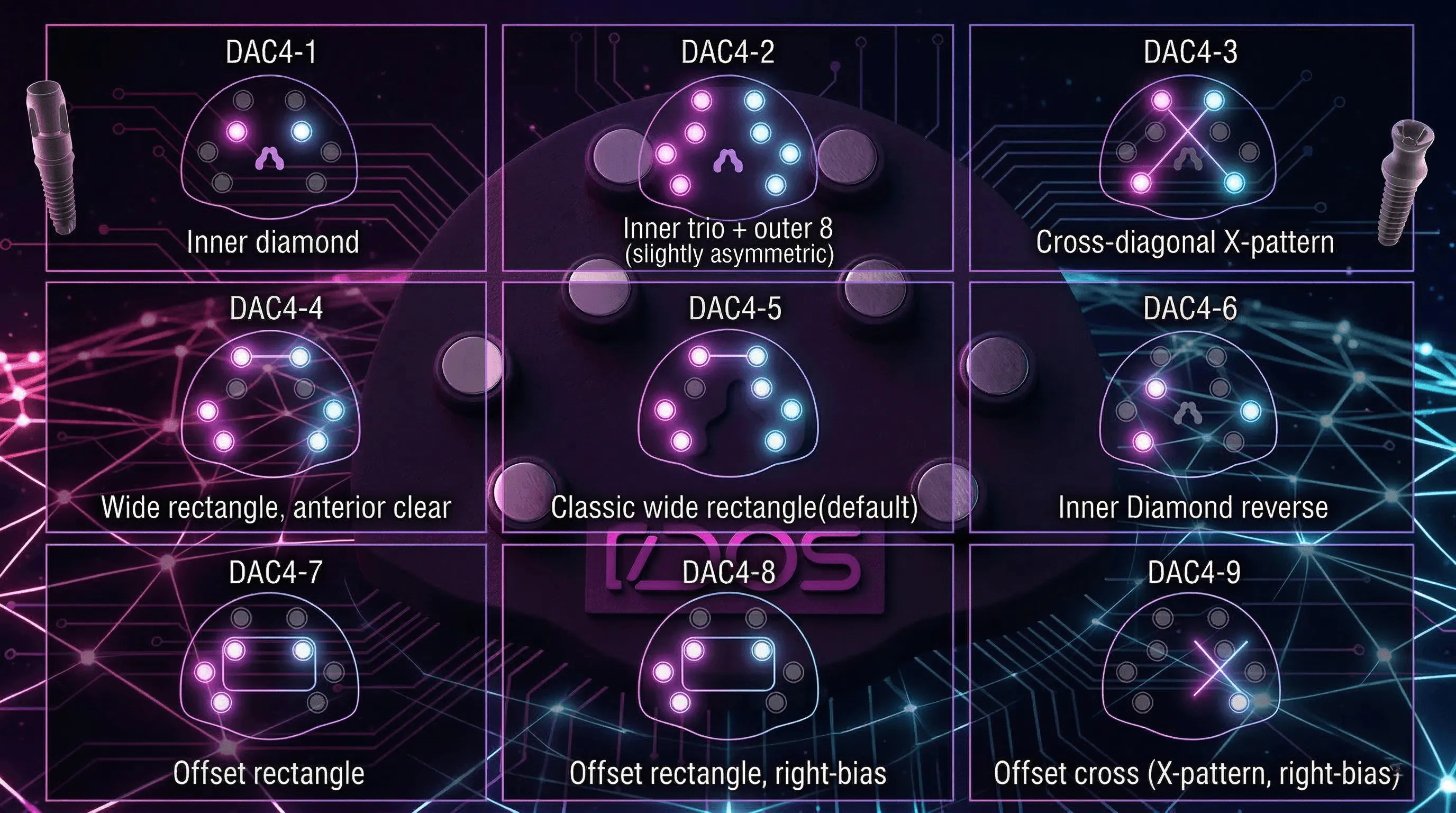
Eight magnets. Four per model. Nine configurations. The only system that lets you choose magnet positions around implant analogs.

Dental Technician Inventor & Founder
The Problem with One Configuration
Every magnetic mounting system on the market gives you one arrangement. One base footprint. One magnet layout. Take it or leave it.
On a single-unit case with no analogs, this could work fine. The magnets engage, the model seats on the articulator. No complaints.
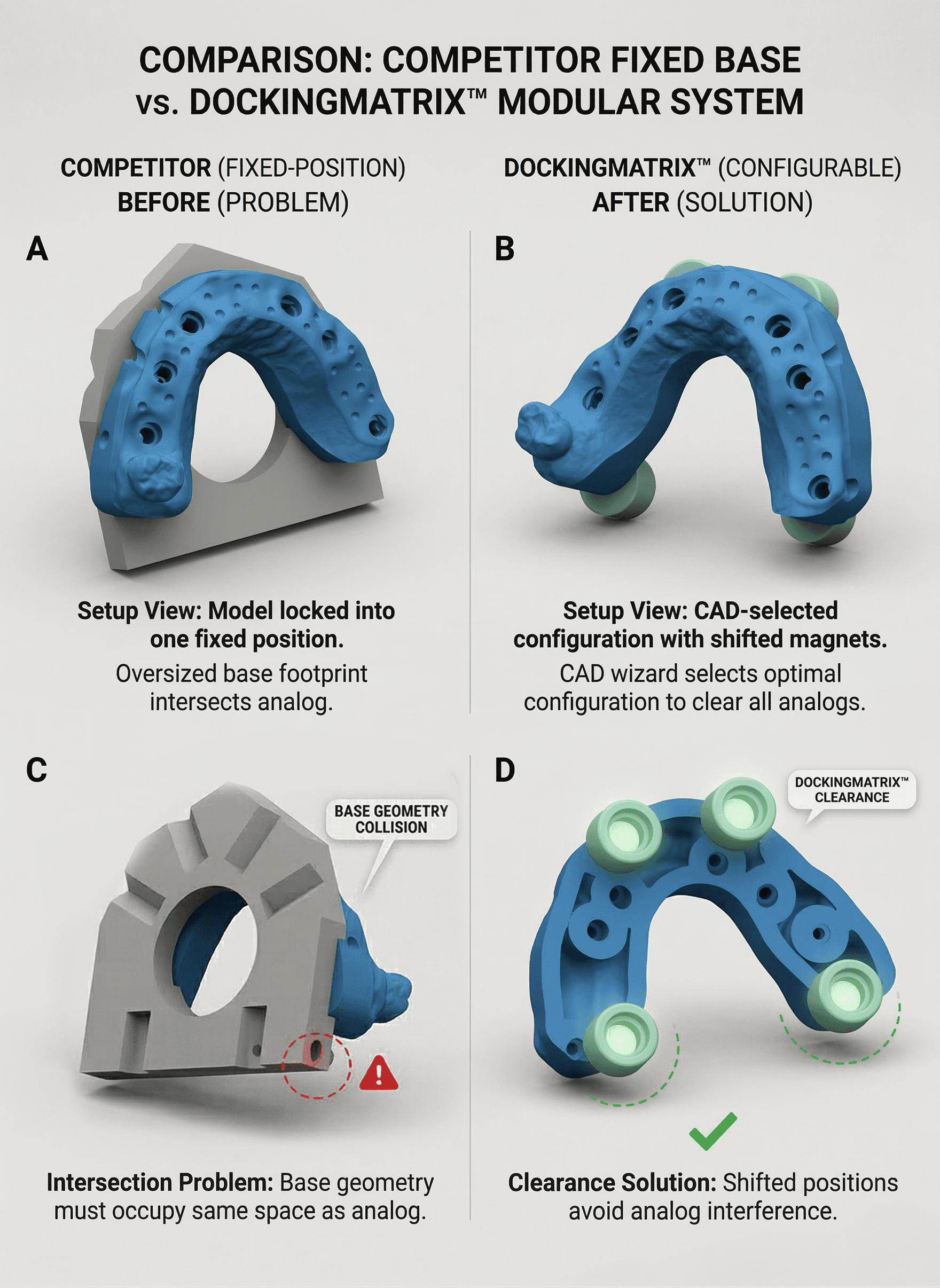
But the moment you have implant analogs protruding from the underside of your model base, the equation changes completely. That oversized base geometry — the one your system locks you into — now physically intersects with the analog. The base itself becomes the problem. It occupies the exact space where your analog needs to be.
This is not a rare edge case. Implant-supported restorations are among the highest-value cases in any lab. Full-arch. Overdenture with bar. Hybrid prosthesis. These are cases worth thousands — and they all feature analogs that protrude below the model base.
So what are the current workarounds? Grind the base down and destroy your reference surface. Reposition the analog and compromise fit. Accept the interference and compromise accuracy. Or abandon the magnetic system entirely and go back to plaster — the very thing you invested in digital to avoid.
None of these are acceptable. On a full-arch implant case, “workaround” is just another word for “risk.”
How DockingMatrix™ Works
DockingMatrix™ is built on a fundamentally different principle: instead of forcing every case into one configuration, it gives you nine.
The DACOS Omni plate carries 8 magnet positions. Each model uses 4 magnets, but which 4 — and where they sit — is entirely configurable. This yields 4 distinct attachment types and 9 possible combinations, each designed to clear specific analog positions while maintaining the full magnetic retention and seating precision of the ZeroDrift™ Transfer protocol.
Here is how it works in practice. Inside your CAD software — whether exocad, 3Shape, or Blender for Dental — you open the DACOS library wizard. The wizard displays your model and shows the available attachment patterns. You select the configuration that avoids your specific analog positions. The wizard then applies the attachment pattern via Boolean operations. Your file exports ready to print, with magnets in positions that clear every analog.
Full-arch with analogs at positions 3, 5, and 7? There is a configuration for that. Overdenture with a milled bar? There is a configuration for that. Kennedy Class I with bilateral free-end saddles and posterior implants? There is a configuration for that.
Every implant case. One system. No compromise.
The compact base footprint of ShieldBase™ Geometry is what makes this possible. Because each individual magnet seat is engineered to be as small as physically viable — with a protected contact zone and a peripheral lip designed for support-free printing — the magnets themselves never interfere with surrounding anatomy. Combine that compact footprint with DockingMatrix™’s configurable positions, and analog interference is eliminated by design, not by workaround.
This is the critical difference. Instead of offering a fixed, oversized base that you must adapt your case to. DACOS Omni offers a modular system that adapts to your case.
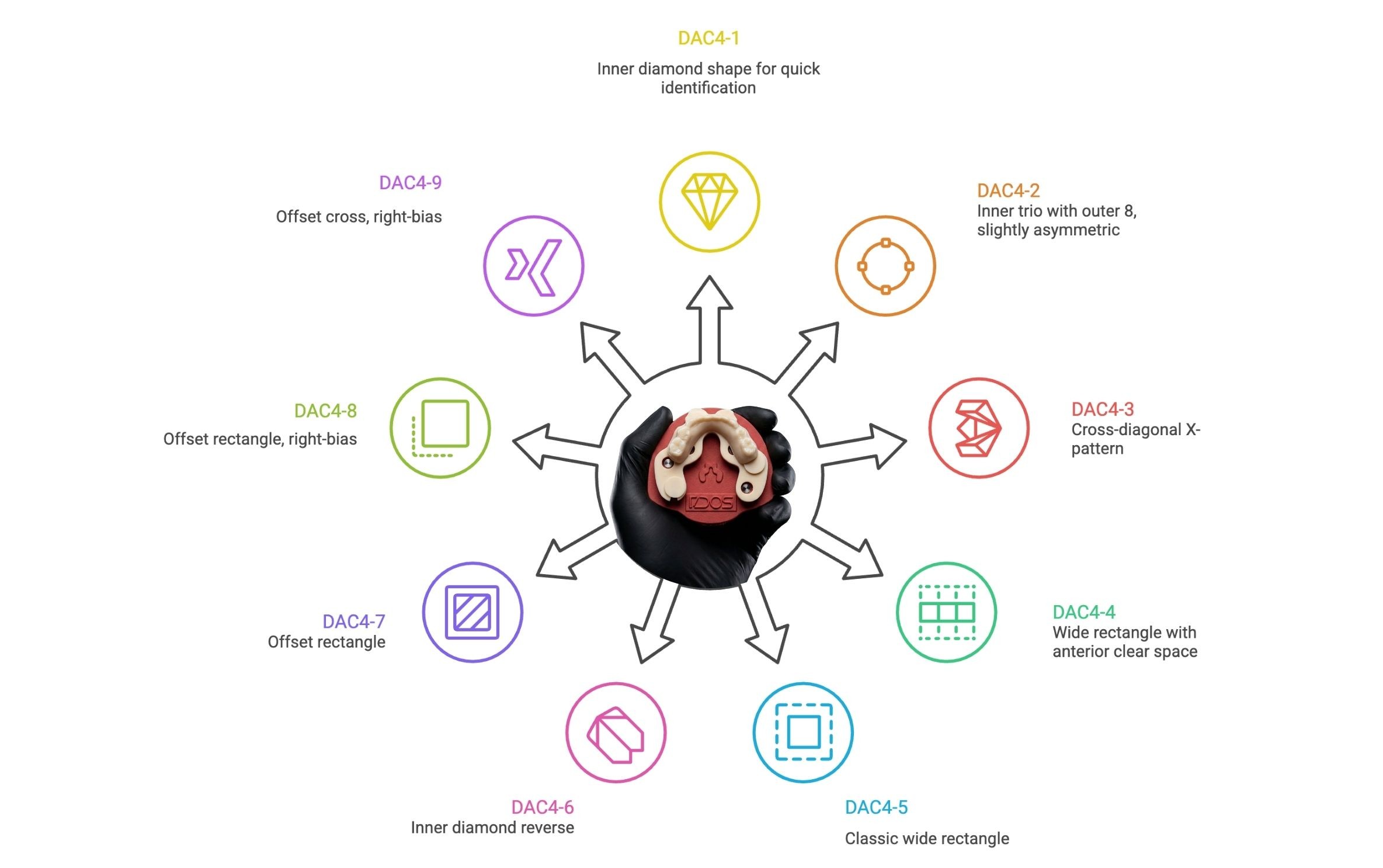
The 9-Combination Matrix
The following matrix shows all available configurations and the case types each is optimized for:
Configuration | Magnet Positions |
|---|---|
DAC4-1 | Inner diamond |
DAC4-2 | Inner trio + outer 8 (slightly asymmetric) |
DAC4-3 | Cross-diagonal X-pattern |
DAC4-4 | Wide rectangle, anterior clear |
DAC4-5 | Classic wide rectangle (default) |
DAC4-6 | Inner diamond reverse |
DAC4-7 | Offset rectangle |
DAC4-8 | Offset rectangle, right-bias |
DAC4-9 | Offset cross (X-pattern, right-bias) |
You do not need to memorize this. The CAD library wizard handles the selection. When you activate the DACOS attachment library, the wizard evaluates the model geometry and suggests compatible configurations. You confirm the selection, and the Boolean operations are applied automatically. The attachment pattern becomes part of your exported file — no external tools, no manual adjustments, no guessing.
For labs that process high volumes of implant cases, this matrix becomes a reference sheet worth bookmarking. It tells you at a glance that every implant scenario has a solution within the system — without ever reaching for plaster.
Protected by International Patent Pending
DockingMatrix™ is not just a feature. It is proprietary, IP-protected technology.
The modular magnetic configuration system — including the attachment patterns, the clearance rules that ensure no magnet seat intersects a removable die or implant analog, and the integration with the CAD library wizard — is covered by pending international patent applications. This is the only modular magnetic configuration system with formal IP protection in the dental articulation market.
No competitor currently offers configurable magnet positioning. And with patent protection in place, this is not a gap they can simply close by copying the concept.
⚡ Patent Pending — Protected by international patent application.
What This Means for Your Lab
If your current system forces you to choose between magnetic mounting and implant cases, you are working within a limitation that does not need to exist. DockingMatrix™ eliminates that choice entirely. Nine configurations. Every implant scenario covered. Zero analog interference.
Combined with ShieldBase™ Geometry for support-free printing, TrueZero™ Calibration for articulator-specific accuracy, and the TrueContact™ Guarantee of ±0.02 mm repeatability, DockingMatrix™ is one of the four pillars that make ZeroDrift™ Transfer the only complete Transfer Fidelity System on the market.
Next reads
Introducing ZeroDrift™ Transfer - From CAD to Articulator →
Transfer Drift — The Error Nobody Talks About →